Axidian CertiFlow system consists of the following services:
- Management console – mc web application.
- Self-service – ss web application.
- Remote self-service – rss web application.
- Smart card unlock service – credprovapi web application.
- API service – api web application.
- Smart card status monitoring – Card Monitor service, no web application provided.
- Agent services:
- Agent Registration Service – agentregistrationapi web application.
- Service for remote task execution – agentserviceapi web application.
Each service has its own configuration files and access settings. |
Run the AxidianCertiFlow.Server-<version number>.x64.en-us.msi file from the Axidian CertiFlow installation package and follow the wizard instructions to complete the installation. Select an access control method for all system applications.
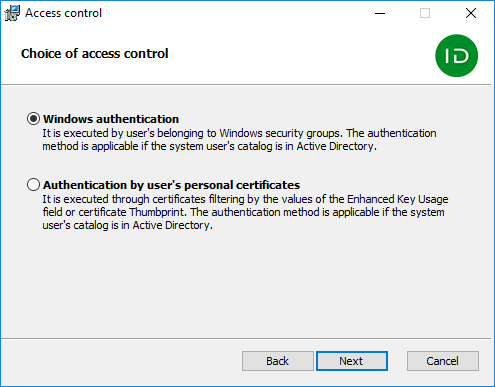
If you select Windows Authentication, the following access control settings will be set:
- Authentication:
- Windows Authentication for mc, ss and api applications. Other methods are disabled.
- Anonymous Authentication for credprovapi, agentregistrationapi and agentserviceapi applications. Other methods are disabled.
- Anonymous Authentication and Forms Authentication for rss application.
- SSL Settings:
- Require SSL for all applications.
- Client certificates:
- Ignore for mc, ss, rss, credprovapi, api and agentregistrationapi applications.
- Require for agentserviceapi application.
If you select Authentication by user’s personal certificates, the following access control settings will be set:
- Authentication:
- Anonymous Authentication for all applications. Other methods are disabled.
- SSL Settings:
- Require SSL – for all applications.
- Client certificates:
- Ignore – for rss, credprovapi, agentregistrationapi applications.
- Required – for mc, ss, api, agentserviceapi applications.
If the users catalog resides in Active Directory, the certificates used for authentication should contain User Principal Name (UPN). Certificates without UPN cannot be used to log in to web applications. |
After Axidian CertiFlow is installed, you can set SSL settings for each application separately in IIS Manager.